GPU Bottleneck Guide: GPU Usage, VRAM, Resolution and FPS
A practical guide to understanding GPU utilization, graphics settings, VRAM, resolution and frame rates so you can tell when your graphics card is actually limiting your PC.
What a GPU bottleneck actually means
A GPU bottleneck is simply a situation in which the graphics processor needs more time than the other major components to complete the work required for a frame. In a game, the CPU prepares game logic, simulation, draw calls and other instructions while the GPU turns that work into the image you see. Whichever side takes longer can become the limiting step.
That sounds simple, but it is important because the word “bottleneck” is often used as if it were a defect. It is not. A computer always has a limiting resource at a particular moment. If you play a demanding game at 4K with high image quality, a high GPU load may be exactly what you want. The question is not whether the GPU is busy. The useful question is whether the GPU is preventing you from reaching the performance target you actually care about.
Is 100% GPU usage bad?
Usually, no. If a game is using 95–100% of the GPU while delivering the frame rate you want, the graphics card is doing its job. High utilization often means the workload is making good use of the available rendering hardware.
Concern becomes more reasonable when performance is below your target, temperatures or clocks are abnormal, or utilization behaves unexpectedly. For example, a game running at 45 FPS with the GPU at 99% utilization is clearly graphics-limited for that particular setting. The same 99% utilization at a stable 90 FPS may be completely satisfactory.
How resolution changes a GPU bottleneck
Resolution changes the number of pixels that must be rendered. Moving from 1920×1080 to 2560×1440 increases the workload substantially, while 3840×2160 creates an even larger rendering task. Higher resolutions therefore tend to shift more games toward the GPU.
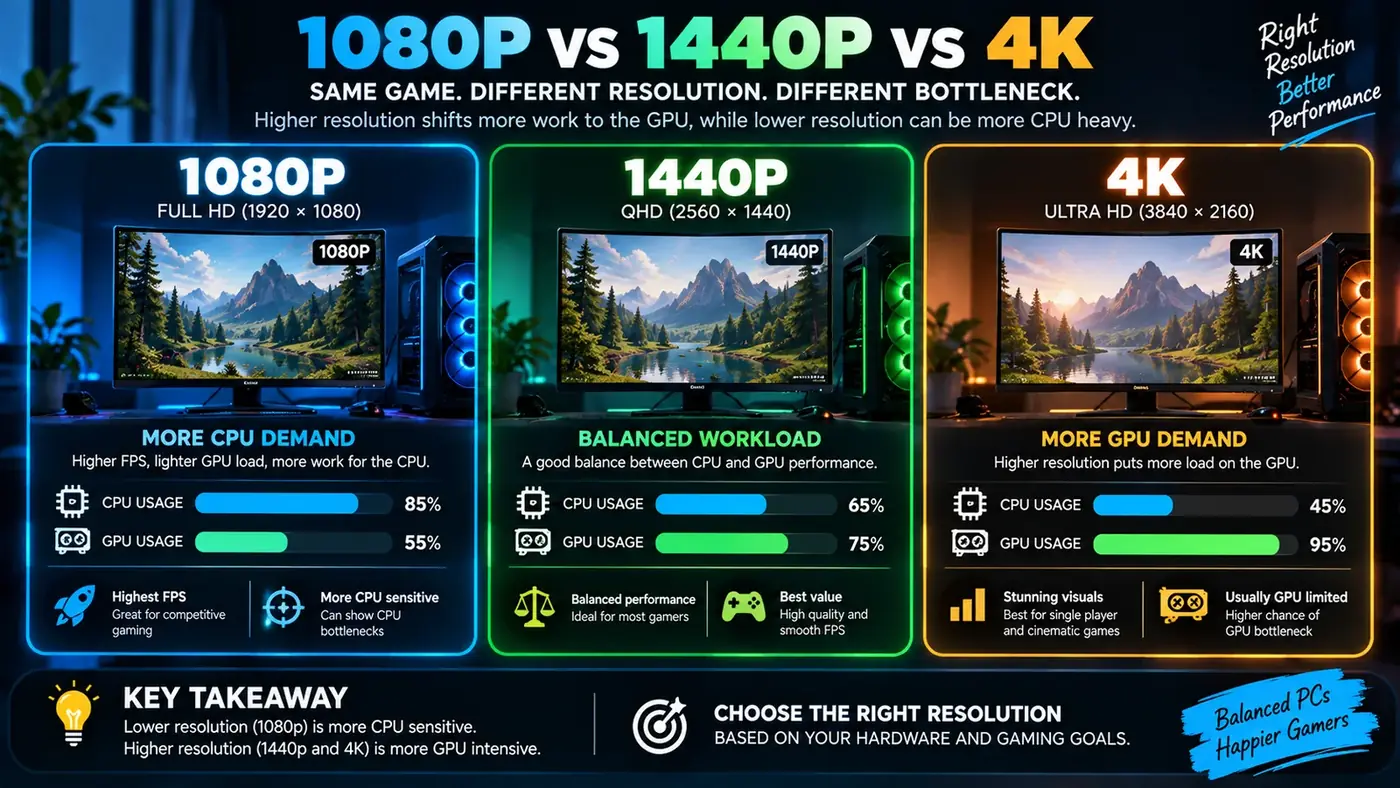
This is one reason a processor and graphics card that feel perfectly balanced at 1080p can behave differently at 1440p or 4K. Resolution is not merely a visual preference; it changes the amount of work the GPU has to perform.
GPU bottleneck vs CPU bottleneck
This guide focuses on the graphics side: GPU usage, VRAM, resolution and graphics settings. A quick test is to lower the resolution or one demanding option such as ray tracing. If frame rate rises a lot, the GPU was a major limit. If it barely moves while one or more CPU cores stay busy, look at the processor instead.
For a full side-by-side comparison, including CPU-limited high-refresh scenarios and when to upgrade which part, read our guide to CPU bottleneck vs GPU bottleneck.
How to read GPU utilization correctly
GPU utilization should be observed together with frame rate, frame time, GPU clock speed, temperature, power and CPU behavior. Looking at one percentage in isolation can lead to the wrong conclusion.
- High GPU usage + stable clocks + target FPS: generally a normal GPU-limited workload.
- High GPU usage + low FPS: the GPU may need more performance for your chosen settings.
- Low GPU usage + low FPS: investigate CPU limits, frame caps, background tasks, drivers, power settings and game-specific behavior.
- High usage + unusually low clocks: check temperature, power limits and cooling before buying new hardware. On a laptop, power limits are usually the cause — see our laptop bottleneck guide.
VRAM: when graphics memory matters
VRAM stores textures, frame buffers and other graphics data. Modern games can consume considerably more VRAM at higher resolutions and with high texture settings. When a graphics card runs short of available VRAM, performance can become inconsistent and texture streaming can suffer.
VRAM usage is not the same as VRAM requirement. A game may reserve memory that it does not continuously need, so seeing a high allocation number does not automatically prove that the card is out of memory. Look for actual symptoms such as stuttering, texture problems or a measurable performance change after lowering texture quality.
Ray tracing and other GPU-heavy settings
Ray tracing can move a workload toward the GPU because it adds additional rendering calculations. Shadows, volumetric effects, reflections, ambient occlusion, global illumination and high-quality anti-aliasing can also change GPU demand. The exact impact varies widely between games. For a full breakdown, see whether ray tracing causes a CPU bottleneck.
If you are troubleshooting a graphics bottleneck, change one setting at a time. A large collection of changes makes it difficult to learn which setting actually mattered.
Refresh rate and your performance target
Your monitor changes the meaning of a bottleneck. A player with a 60 Hz display may be satisfied with a steady 60 FPS, while a competitive player using a 240 Hz monitor may care about much higher frame rates and lower frame times. The same PC can therefore be “fast enough” for one target and limiting for another.
Frame rate is also only part of the experience. Frame-time consistency matters. A system that averages 100 FPS but produces frequent long frames can feel less responsive than the average number suggests.
How to test a suspected GPU bottleneck
- Record the game, resolution, graphics preset and target FPS.
- Measure GPU utilization, GPU temperature, clock speed and FPS during the same scene.
- Lower resolution or a GPU-heavy setting.
- Repeat the test without changing other variables.
- Compare the change in FPS and frame time.
If lowering the GPU workload produces a large performance improvement, the graphics card is likely important to the limit. If almost nothing changes, look at CPU behavior, memory pressure, frame caps and software configuration.
When a GPU upgrade makes sense
A GPU upgrade is most relevant when your current graphics card is consistently the limiting component and the replacement would help you reach your target resolution, image quality or frame rate. Compare the cost of the upgrade with the actual improvement you need rather than choosing a component because it has a higher model number.
Also check the rest of the system. A faster graphics card can expose a CPU limit, insufficient power supply capacity, thermal problems or memory limitations. A balanced upgrade is more useful than simply replacing the most visible component.
Use a calculator as a starting point, not a measurement
A bottleneck calculator can help you compare CPU and GPU combinations and understand how a workload may behave. It should not replace measurements from the game or application you actually use. Real performance depends on the software engine, drivers, settings, background processes, cooling and many other variables.
Practical checklist
- Check FPS and frame time before changing hardware.
- Monitor GPU utilization during the actual workload.
- Check GPU temperature and clock speed.
- Test resolution and graphics settings separately.
- Watch VRAM usage for demanding games.
- Check CPU utilization and individual core behavior when GPU usage is unexpectedly low.
- Consider your monitor refresh rate and target FPS.
- Use a PC bottleneck calculator as a planning aid, then verify with real measurements.
Examples from common gaming situations
Consider a 1080p competitive game where the graphics card is capable of very high frame rates. If the GPU is sitting at 60% while one CPU thread is heavily loaded and frame time rises during crowded scenes, the processor may be controlling the result. Move the same PC to 1440p with higher image quality and the graphics card may become the main limit. This is why a component pairing cannot be judged without a workload.
Now consider a demanding single-player title at 4K. If the GPU remains near full utilization and lowering resolution produces a large FPS increase, the graphics card is doing most of the work. That can be an entirely sensible configuration. A GPU working hard at your target frame rate is usually preferable to a system that is expensive but unable to use its graphics hardware efficiently.
Textures, VRAM and stuttering
Texture quality is worth separating from settings that change rendering calculations. High-resolution textures can increase VRAM demand without always producing the same kind of GPU compute load as ray tracing or complex lighting. If a game offers texture-quality options, test them separately when investigating VRAM behavior.
Stuttering has many causes, so avoid declaring a VRAM bottleneck from one number in a monitoring overlay. Compare the same scene with a lower texture setting and watch for changes in frame-time consistency, texture streaming and memory allocation. The goal is to reproduce the symptom and find the setting that changes it.
Drivers, game patches and background software
Graphics performance can change after a driver or game update. A new version may improve one title and behave differently in another. Background recording, browser tabs, overlays and capture tools can also change CPU or GPU workload. If a result looks unusual, repeat the test after closing unnecessary software and make sure the game is running under the intended driver profile.
How to make a useful GPU upgrade decision
Start with the target rather than the product name. If you want higher 1440p FPS, identify the settings that currently prevent that target. If you want 4K image quality, look at GPU rendering performance and available VRAM. If the graphics card is not heavily loaded because the CPU is already limiting frame delivery, a faster GPU alone may not solve the problem.
Conclusion
A GPU bottleneck is not automatically a problem. It is a description of which part of the rendering pipeline is limiting performance in a particular workload. High GPU utilization can be perfectly healthy when the frame rate meets your target. The most reliable approach is to combine GPU usage, frame time, resolution tests, temperatures and your own performance target before deciding whether an upgrade is necessary.
Sources
Official documentation and tools referenced in this guide: